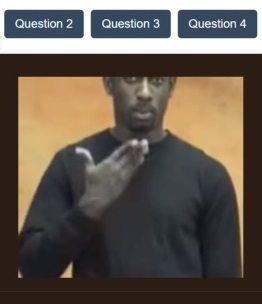
Master finger-spelling, visual comprehension, and vocabulary offline. Student speaks or selects their answer — app auto-marks and sends grade to tutor instantly.
📚 Voice Answer
Reading & Comprehension
Students read passages and speak comprehension answers aloud. AI marks every response and sends a full grade report to both student and tutor.
📚Reading App
⚡ Now Available
EV & Hybrid Repair Theory
Electric and hybrid vehicle repair theory — diagnosis, systems, and safety procedures, with quizzes and a progress dashboard. ✓ Course modules by system ✓ Practice & official quizzes ✓ Personal progress dashboard
🔊 Hear It, Spell It
Audio Spelling
The system calls out a word. The student spells it by speaking or typing. Auto-marked, grade sent to tutor instantly.
🔊Audio Spelling
🚗 Now Available
Drivers License Test — Theory Preparation
Audio read-along notes and audio-answered practice questions covering cars, motorcycles, and trucks — technical automotive prep built the same way as our other skills: listen, answer, get marked automatically.
🏭 Now Available
Construction — Masonry Level 1
Based on Heart Trust/NTA's Masonry Level 1 curriculum — real trade skills, from measurements to block-laying and rendering. Questions appear on screen. Students speak their answers. AI engine recognises speech, marks against the answer key, and delivers grades to student and tutor automatically.
🧑 Tutor Edition
Tutor Dashboard — Build, Assign & Track
Create custom quizzes, add your own words and questions, assign sessions to students, and watch every grade come in live.
🧑Tutor Dashboard
🔒 Platform Access
After purchase, log in here to access all web features — spelling, reading, comprehension, and more.
Access your assigned spelling activities, reading sessions, and comprehension quizzes. View your grades.
👨🏫
Teacher / Tutor Login
Add words, assign spelling and reading activities, set quizzes, and view all student grades in real time.
All LiteSkills Apps & Features
Five tools, one platform. Every activity auto-marks and reports grades to both student and tutor.
🤟
Mobile · Offline
Sign Language Spelling & Comprehension
Image-based finger-spelling and visual word matching. Fully offline — no data needed.
Offline image database
Visual comprehension quizzes
Spoken answer detection
Auto-mark & grade report
📚
Voice · Auto-Mark
Reading & Comprehension
Students read passages and speak comprehension answers. AI marks instantly and reports grades.
Read-aloud recognition
Spoken comprehension answers
Instant feedback
Progress reports to tutor
🔊
Audio · Speak to Spell
Audio Spelling
System reads words aloud. Student spells by speaking or typing. Auto-graded instantly.
System calls the word
Spoken or typed spelling
Instant right/wrong feedback
Grade sent to tutor
🎤
Speak Your Answer
Voice Response — Any Subject
Questions appear on screen. Students speak their answers. AI engine recognises speech, marks against the answer key, and delivers grades to student and tutor automatically.
Any subject or question type
Speech-to-text marking
AI hint assistant
Default question sets included
🧑
Tutor · Pro
Tutor Dashboard & Quiz Builder
Build custom quizzes, add your own questions, assign sessions to students, and track every grade live.
Custom quiz builder
Add own questions & answers
Assign sessions to students
Live grade dashboard
🌐
Web · Browser
Web Study Portal
Full HD GIF libraries, interactive audio exercises, and a built-in AI study agent. No download needed.
HD visual dictionaries
Interactive audio engine
AI study assistant 24/7
Syncs with mobile apps
🤖 Every Activity Auto-Marks & Reports Grades
No manual marking. No waiting. The moment a student submits, the grade is calculated and delivered to both the student view and the tutor dashboard automatically.
1
Student Completes Activity
Spells, reads aloud, or speaks answer in the platform.
2
AI Marks Instantly
Speech or text compared to answer key, scored in seconds.
3
Grade Delivered
Student sees result. Teacher dashboard updates live.
Why LiteSkills Digital?
The advantages of our platform at a glance.
📲 Mobile App Advantages
Works fully offline — no data or Wi-Fi needed
Voice answer recognition built in to every app
Audio spelling — system calls the word to spell
Instant auto-marking with zero manual effort
Grades sent to student and tutor automatically
Visual sign language image database included
Works on any Android device
One-time US$9 upgrade — no subscription
🌐 Web Platform Advantages
Full HD GIF visual dictionaries
Teacher adds words and reading sentences online
Students submit spelling and reading activities
Teacher views and records all grades in real time
Built-in AI study assistant 24/7
Works on any browser — no install needed
Up to 10 words per spelling activity
Up to 5 sentences per reading activity
Simple, Transparent Pricing
Pay once or monthly — full platform access after purchase.
📲
Student — Mobile App
US$9 one-time
Includes free web access when logged in
All 4 student apps unlocked
Offline access
Voice and audio spelling
Auto-marked results
Grade sent to your tutor
Web portal access free
🌐
Student — Web Only
US$9 one-time
Web access only — no mobile app
Spelling activity access
Reading activity access
AI study assistant
Progress tracking
Grades reported to tutor
🧑
Teacher / Tutor
US$12 /month
or US$30 every 3 months (save US$6)
Add words and reading sentences
Assign activities to students
Live grade dashboard
Custom quiz builder
Web + mobile dashboard
Cancel anytime
Our Mission — LiteSkills Digital
We build accessible educational software designed for local data integrity. By removing institutional friction and pairing zero-bandwidth student apps with cloud management tools for independent tutors, we open interactive learning to everyone — from any device, anywhere in Jamaica and beyond.
🔒 Platform Access Portal
Purchase access below, then log in to use all spelling, reading, and comprehension features on the web platform.
📲 Already have the mobile app? Log in with your app account email to access the web platform free — no extra payment needed.
🎓
Student / Pupil
Access spelling activities, reading sessions, and comprehension quizzes. See your grades.
👨🏫
Teacher / Tutor
Add words, assign activities, set quizzes, and view all student grades live.
🎓
Student Login
Enter your name or student ID to access your activities.
Complete your assigned spelling and reading activities below.
🔊 Spelling Activity — Week 1
Listen to each word, then spell it by speaking or typing. You have 10 words to complete.
Activity: A1 — Basic Vocabulary | Date: July 2026
0 of 10 words completed
Current word:
🔊
Click 🔊 Play to hear the word
📚 Reading Activity — Week 1
Click a sentence below to read it. Enter your name/ID, then click Start to read aloud. Submit each sentence when done.
Activity: R1 — Basic Sentences | Up to 5 sentences
Read this sentence aloud:
📊 My Grades
Spelling A1 — Week 1Pending
Reading R1 — Week 1Pending
🧑 Teacher Dashboard
Manage words, sentences, quizzes and student grades.
Add Words for Spelling Activity
Enter a word below and add it to the current spelling list. Students will hear each word and spell it.
Current word list (0/10):
Add Reading Sentences
Add up to 5 sentences for students to read aloud. Each sentence should have up to 10 words.
Current sentences (0/5):
📊 Student Grades — Live View
Grades update automatically when students submit their work.
🔊 Spelling A1No submissions yet
📚 Reading R1No submissions yet
🔒 In the full connected version, real student submissions appear here automatically in real time.
❓ Quiz Builder
Add questions and correct answers for the Voice Response or general knowledge quiz activities.
🌐 Web Versions
Our web versions run in any browser — no download needed. Upgrading the mobile app gives you free web access. Otherwise, purchase web-only access below.
💡 Already upgraded the mobile app? Log in with your account email at the Access Portal to get free web access automatically.
🤟
Web · Sign Language
Sign Language Web Version
HD finger-spelling GIFs, visual vocabulary, and interactive comprehension quizzes in your browser.
✓HD finger-spelling GIF library
✓Visual comprehension quizzes
✓Spoken answer detection
✓Auto-mark & grade report
US$9 one-time
📚
Web · English Literacy
English Literacy Web Version
Reading, comprehension, and audio spelling. Passages, spoken answers, and the word-calling spelling engine in your browser.
✓Spelling — up to 10 words per activity
✓Reading — up to 5 sentences per activity
✓Spoken answers & audio playback
✓Auto-mark & grade to teacher
US$9 one-time
Best Value
🎤
Web · All Subjects
All Subjects Web Version
Everything unlocked — sign language, literacy, audio spelling, and voice response for any subject.
✓All web apps unlocked
✓Voice response any subject
✓AI study assistant 24/7
✓Full grade reporting
US$15 one-time
🧑 Teacher Web Dashboard
Manage students, add words, assign activities, and view grades from any browser.
📲 Mobile + Web · Offline
🤟 Sign Language Comprehension & Spelling
Built around an offline visual database of hand signs and finger-spelling images. Students can study, practice, and take quizzes anywhere — no internet or mobile data required.
Key Features
Full offline image database
Finger-spelling and full-word sign recognition quizzes
Spoken answer detection — student speaks, app marks
Auto-marking with instant right/wrong feedback
Grade report sent automatically to tutor dashboard
📚 Voice Answer
📚 Reading & Comprehension
Students read passages and answer comprehension questions using their voice. No typing required. The built-in speech engine captures the answer, marks it in real time, and sends the grade to the tutor.
Key Features
Up to 5 sentences per activity, up to 10 words each
Student enters name/ID then clicks Start to read
Read-aloud mode with fluency scoring
Spoken comprehension answers detected and marked
Grade report sent to tutor after every session
🔊 Hear It, Spell It
🔊 Audio Spelling
The system calls out a word. The student spells it by speaking or typing. Traditional spelling tests — now digital, auto-marked, and grade-reported instantly.
Key Features
Up to 10 words per spelling activity
Student submits name/ID before starting
System reads each word aloud — student clicks Start to spell
Spoken or typed spelling accepted
Instant right/wrong per word, full grade to teacher on submit
Tutor sets custom word lists from dashboard
🎤 Speak Your Answer
🎤 Voice Response — Any Subject
Questions appear on screen. Students speak their answers. AI engine recognises speech, marks against the answer key, and delivers grades to student and tutor automatically.
Key Features
Works for any subject
AI recognises partial and full correct responses
Built-in hint system powered by AI assistant
Tutors upload custom question sets from dashboard
Default sets included — General Knowledge, Jamaican History, Maths, Science, English
🧑 Tutor Edition · US$12/month
🧑 Tutor Dashboard & Quiz Builder
Full control over your students' learning — without going through any institution. Add words, set reading sentences, build quizzes, assign sessions, and watch grades come in live.
Tutor Features
Add words for spelling activities (up to 10 per activity)
Add reading sentences (up to 5, up to 10 words each)
Custom quiz builder — add your own questions and answers
Assign sessions to individual students or groups
Live grade dashboard — see results the moment a student submits
AI fallback — students get hints when no tutor is online
About LiteSkills Digital
LiteSkills Digital Limited is an educational technology company building accessible spelling, reading, and literacy tools for learners and independent tutors across Jamaica and the wider Caribbean.
We design software that works without reliable internet, without institutional approval, and without expensive hardware — because learning should never be gated by circumstance.
Our Platform — Skills & Literacy
The Skills & Literacy platform (branded as EduLearn Suite on Google Play) combines offline mobile apps with a web portal for teachers to assign spelling and reading activities, mark student work automatically, and track progress over time.
What We Build
Offline-first Android apps — work without mobile data
Audio spelling — system calls words, student spells by voice or type
Reading activities — up to 5 sentences, student reads aloud
Voice response engine — any subject, AI auto-marks spoken answers
Teacher dashboard — add words, assign activities, view grades live
Company
LiteSkills Digital Limited Kingston, Jamaica ✉ support@liteskillsdigital.com
Contact & Support
✉ Email
support@liteskillsdigital.com
⏰ Response
Within 1 business day
🕐 Hours
Mon–Fri 8am–6pm JA time
Privacy Policy
LiteSkills Digital Limited — Last updated: July 2026 — Google Play Store Compliant
1. Data We Collect
Account name and email address
Student name or ID (entered by student or teacher)
Session results and grade data
Speech audio — processed on-device only, never stored on our servers
Anonymous app usage analytics
2. How We Use Your Data
Data is used only to deliver grade reports, track learning progress, and operate the platform. We do not sell data to third parties.
3. Children's Privacy (COPPA)
For users under 13, a parent, guardian, or teacher account must authorise the student account. We collect only the minimum data necessary. We do not display advertising to any users, especially children.
4. Speech Data
Voice responses are processed on the device to mark spelling and reading submissions. Audio is never uploaded or stored on our servers.
5. Data Safety (Google Play)
No sensitive personal data is shared with third parties. Data is encrypted in transit and at rest. Users can request deletion at any time: support@liteskillsdigital.com
6. Cookies & Analytics
The web platform uses anonymous session cookies to keep you logged in. No advertising cookies are used.
7. Contact
LiteSkills Digital Limited — support@liteskillsdigital.com
Terms of Service
LiteSkills Digital Limited — July 2026
1. Acceptance
By using LiteSkills Digital apps or web services you agree to these terms.
2. Accounts
Teachers are responsible for the students they link to their account. Students must not share access codes.
3. Payments
The US$9 student upgrade is one-time. Teacher plans are monthly (US$12) or quarterly (US$30) and can be cancelled at any time. Refunds follow Google Play Store policy.
4. Acceptable Use
You may not attempt to reverse-engineer, redistribute, or manipulate the auto-marking system.
5. Intellectual Property
All content, GIFs, word lists, and question banks are the property of LiteSkills Digital Limited.
6. Contact
support@liteskillsdigital.com
COPPA & Child Safety Policy
LiteSkills Digital Limited — Google Play Store Compliant
Our Commitment to Child Safety
LiteSkills Digital is designed for students of all ages including children under 13. We comply fully with the Children's Online Privacy Protection Act (COPPA) and Google Play's Families Policy.
What We Do NOT Collect from Children
No full name required — student ID or first name only
No location data
No photographs or images of students
No advertising identifiers
No data shared with advertising networks
Parental & Teacher Control
All student accounts must be created by a teacher or parent. Students cannot self-register. Teachers control all access codes and can remove student access at any time.
Speech Processing
Voice input is processed entirely on-device. No audio from children is transmitted to or stored on our servers at any time.
Advertising
We display no advertising of any kind in the app or on the web platform. There are no in-app purchases available to students.
Data Deletion
Parents or guardians may request deletion of any student data by emailing support@liteskillsdigital.com. Requests are processed within 5 business days.
Data Consent & User Rights
What You Are Consenting To
When you create an account or purchase access, you consent to LiteSkills Digital storing your name, email, and grade data for the purpose of running the platform and delivering grade reports.
Your Rights
Right to access your data — email us at any time
Right to correction — we will update incorrect data promptly
Right to deletion — your account and all data removed within 5 days of request
Right to withdraw consent — cancel your account at any time
How to Exercise Your Rights
Email support@liteskillsdigital.com with the subject "Data Request" and we will respond within 2 business days.
Third Parties
Payment processing is handled by Stripe. We share only your email and payment amount with Stripe — no educational or grade data is shared. Stripe's privacy policy: stripe.com/privacy
🧑
🔒 Secured by Stripe · SSL Encrypted · Card data handled by Stripe only